There was a problem loading the comments.

How to input grades

Support Portal  »  📚 Knowledgebase  »  Viewing Article

  Print

Student grades can only be submitted, inputted, and processed by the assigned class teacher via the Faculty Portal.

For optimal viewing of the Grade Book and Grades Sheet, we recommend using a tablet, laptop, or desktop. If using a mobile device, please rotate the display and flip to landscape mode.
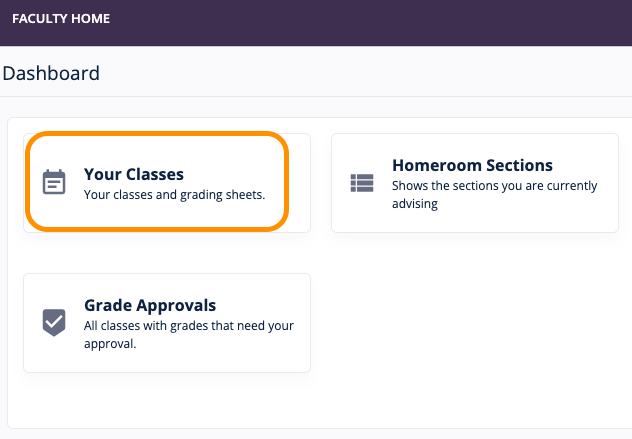
  1. Access the list of handled classes or your teaching load by going to Your Classes.
  2. Select and click the class name to open the class details page.
  3. Click Open Grade Book or Open Grade Sheet.
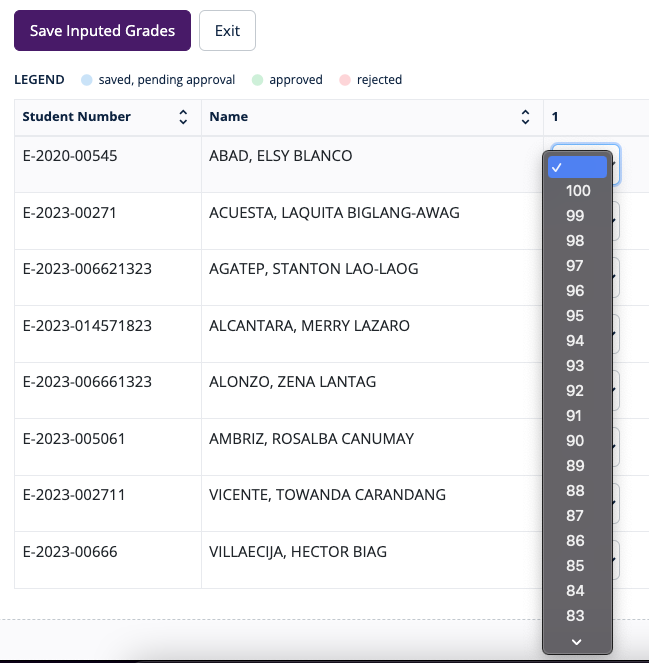
  4. Input or select grades as set.

Share via
Did you find this article useful?  

Related Articles


Self-Hosted Help Desk Software by SupportPal
© GradoLIS
